Create a sleep diary
A sleep diary is a record of sleep-related events. This can be as simple as a paper record of your wake and sleep times, or it can be a record of everything you think might be related, or even a tool to automatically measure your activity.
The golden rule
The best sleep diary is the one you can sustain in the real world.
Maintaining a sleep diary is a surprisingly personal experience. You need to think about it in the moments before you close your eyes at night and after you wake up in the morning, so a diary that seems bold when you're wide awake can be an unmanageable chore as you rub the sleep from your eyes.
Pick whichever approach below you prefer, and don't be afraid to try things out and switch if they're not working.
Official forms
If the goal of your sleep diary is to convince an organisation that has specific requirements, it's usually best to use the form they provide. This is the most effective way to make your case, but can make it hard to do your own analysis — so you might prefer to keep two diaries at once: the one they give you, and your preferred one from below.
Browse forms in the specialist directory
Hand-made diaries
The easiest way to get started is to record your sleep in a spreadsheet or on paper. The main benefit is flexibility — you can add and remove fields when you think of them, and even doodle on a paper diary. A pencil-and-paper diary is also completely disconnected from the digital world, while a spreadsheet can be analysed or converted to other formats later.
Hand-made tables
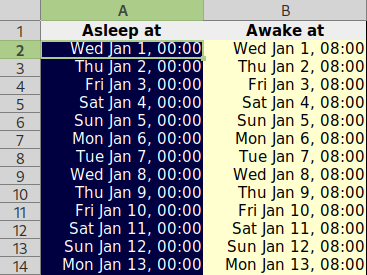
Some people prefer to record their diary as a table of numbers. This can be easier, because you just write whatever your watch says when you go to bed and wake up.
Tip
Write dates in 24-hour format.
Hand-made tables may be the easiest way to get started, but they can require more discipline than digital formats. For example, if you see an entry that claims you went to bed at 1:30 one day last week, you might wonder if you meant to write 11:30 instead. If you find yourself blaming yourself for not keeping that discipline, consider switching to a digital solution that does the boring parts for you.
Download the sleep table (.xlsx)
Hand-made graphs
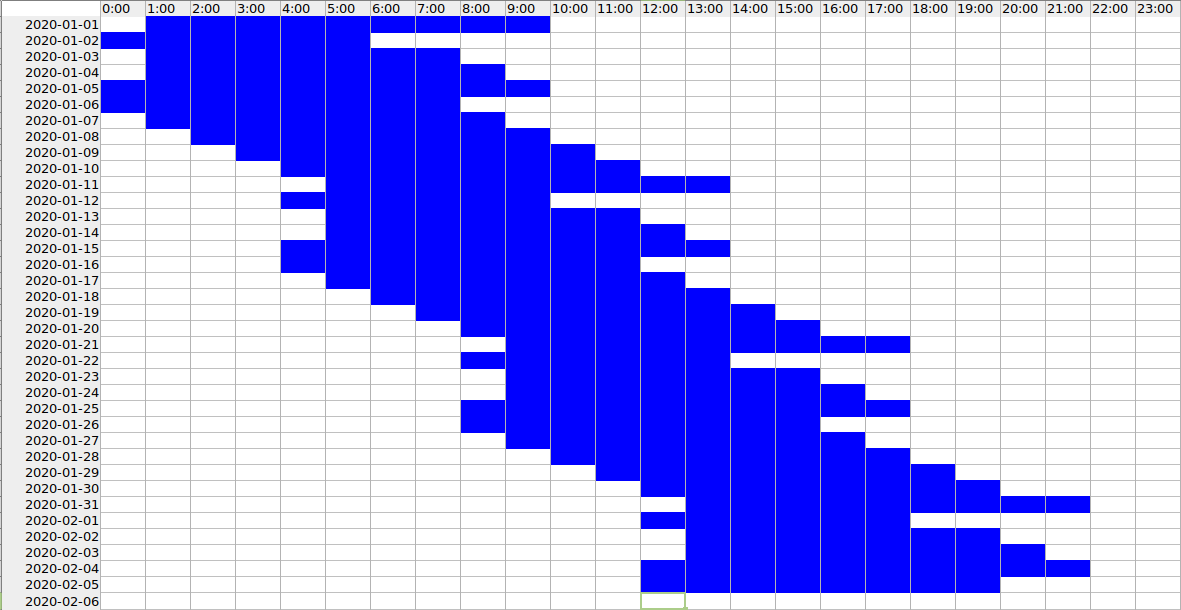
A more visual solution is to mark out 24 columns (or 24 rows), then shade in the times when you're awake and asleep. You'll need a ruler to do this on paper, but the result can be more intuitive because you can see your sleeping pattern at a glance.
Tip
Make the wake and sleep periods as distinct as possible, preferably by shading boxes to indicate sleep times.
Download the sleep graph (.xlsx)
Sleep Disorder Patient Charts
The Sleep Disorder Patient Chart, pioneered by Harvey Moldofsky and James G. Macfarlane in the early 1990s, has come to be widely used by sleep doctors around the world. The exact layout differs between organisations, but they're usually similar.
It can be hard to sustain the amount of data this chart requires, because you need to track multiple events throughout your day. You might prefer to use this format while you're waiting for an appointment with a sleep doctor, but something easier the rest of the time.
The Zeitlog dashboard has a printable report that resembles a Sleep Disorder Patient Chart, and can be built from many diary formats (including the spreadsheets above).
Example chart (Sleep Support Project)
Software, apps & devices
There are several programs and devices to help maintain a sleep diary. They all have strengths and weaknesses, so it's best to try them and see what works for you.
- Specialised devices — if you already use an activity tracker such as a Fitbit or Samsung Galaxy Watch, you can often add sleep tracking. These track automatically, so you get more detail without writing anything down — but they might not capture whether you were actually asleep or just lying still.
- Mobile apps — apps like Sleepmeter and Sleep as Android sit by your bedside without a dedicated device, and most app stores have several to try.
Browse the software directory Supported import formats
Reconstructing a diary
A lot of software records when events happen — your calendar has start and end times, and your browser cache stores when you visited each page. Reconstructing a diary from such sources is technical and often inaccurate, but it can give you an idea of your past sleep trends.